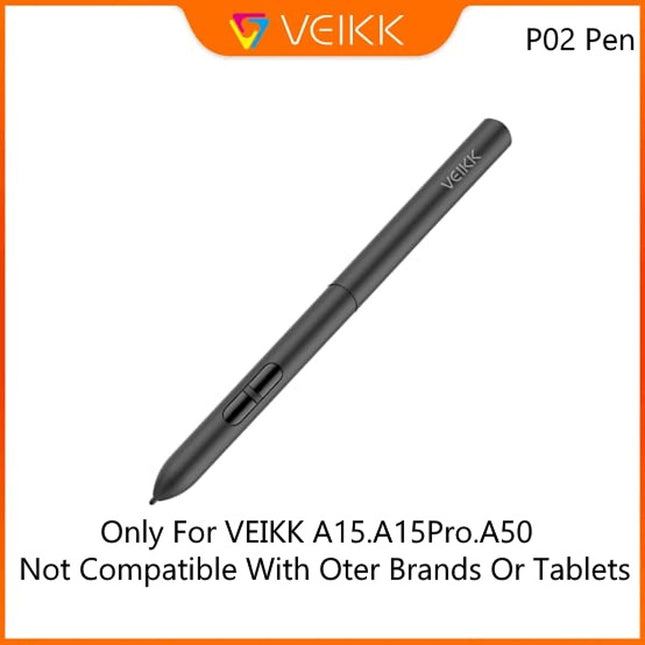
Suitable for VEIKK Graphic Drawing Tabblet A50 and A15 and A15Pro
Replacement for Graphics Drawing Stylus
Package Contain:1 Pen and 1 Pen Bag
Battery free:there are not charged
Battery-free Stylus - Only COMPATIBLE to Huion Inspiroy H640P/H950P/H1060P/H610Pro V2/HS610/HS64/H420X/H580X/H610X; Never worry about pen-charging, and eco-friendly of use; Without operating battery, the pen is only 16g in weight, and its front end is made of wearable silicone for soothing feel.
NOT COMPATIBLE with iPad, other Graphics Tablet or Huion Graphics Monitor GT Series
Two Customizable Pen Buttons - Set the function to your reference like eraser, fasten your working efficiency; Palm rejection design of dual keys on both sides of the pen helps reduce touch frequency and realize most effective creation.
Long-lasting Lifespan - First of Huion's products features battery-free stylus, say goodbye to charging cables; Don't need to worry about the potential battery leakage and run-out.
8192 Levels of Pen Pressure Sensitivity - Enjoy the accuracy and precision when drawing; Having 233 PPS report rate, 5080LPI resolution, you can paint or draw or sketch smoothly on your Huion Inspiroy series Tablets.
Huion HS64· Huion HS64 SE· Huion HS610· Inspiroy H640P· Inspiroy H950P· Inspiroy H1060P· Inspiroy H1161· Inspiroy H610 PRO V2· Inspiroy Ink H320M· Inspiroy H420X· Inspiroy H580X· Inspiroy H610X
【Multi-compatible, Multi-purpose】Huion H580X graphic design tablets can widely compatible with your device in Linux(Ubuntu), Windows 7/8/10 or later, MAC OS X 10.12 or later and Android 6.0 or later( Not suitable for IPhone/IPad). And suitable for the softwares such as Corel Painter, CorelDraw, Adobe Photoshop, Adobe Illustrator,SAI etc. It is design for artist, teachers,students and also for gamer etc.
【Compact, Portable and Practical】8X5 inch working area and it’s so lightweight only 343g. This drawing pad support to rotate 360°, so it is suitable for both left-handed and right-handed. It can perfectly replace paper and mouse while connecting with computer/mobile phone, which is convenient for your life.
【Same Button, Different Functions】H580X animation tablet has 8 customizable shortcut keys. In addition, according to personal habits, different commands can be set for different software on the same shortcut key at the same time.
【Battery-free Stylus, Pen Holder】The huion drawing pad comes with a Battery-free Stylus PW100 and a pen holder. The pen with 8192-level pressure sensitivity and ±60° tilt function can provide you with a better and precise work or study experience. And the pen holder has 8 nibs for replacement inside.
【Easy Setup and Easy Play】Simple connect huion drawing tablet to your computer via included USB-C cable, download and install driver (the latest version of the official website), next you can start your work, study or play. If you have any questions and doubts about the product, please feel free to contact us.
Connect Laptop/Mac
H580X is not a standalone drawing tablet. It must be connect to a Laptop/Computer/Android Phone to work.
Compatible with Windows 10/8/7, MacOS 10.12 or later, Android 6.0 or later and Linux(Ubuntu).
Simply connect the pen tablet to your device via USB cable, donwload and install the latest tablet driver from Huion official website, using the digital pen just as a replace computer mouse and the paper-like surface will give you natural pen-on-paper experience.
Connect Computer
This computer drawing pad is perfect for online education on Computer. Simple plug and play via USB connection, battery-free digital pen, ensure that making handwritten notes on Huion tablet during video calls or whilst viewing material on your Computer is as simple and intuitive as it should be. Widely compatible and fully integrated with Computer devices, meaning that you can get even more out of all its apps thanks to the power of the pen – take notes on Google Keep, sketch diagrams on Google Canvas and collaborate with your teacher and classmates with Google Jamboard.
Connect Android Phone
Compatible with Android 6.0 or later( Not suitable for IPhone/IPad)
Comes with OTG adapters (USB to Type C ), you can easily connect to the Android phone and enjoy On-The-Go technology anytime and anywhere.
Note: The cursor does not show up in SAMSUNG device at present(except SAMSUNG Note Series).
Battery-free Pen & Tilt Function
PW100 No need to charge, so you can start creating immediately. Also comes with a pen holder which included 8 pen nibs inside.
Adopting the advanced pen tilt technology, the PW100 pen supports±60 levels tilt recognition, making it performs like traditional brushes, pencils and markers.
8 Handy Shortcuts
Come with 8 express keys on the left side of the digital tablet which can be customized to zoom, eraser, undo, copy, paste, scroll etc. It all depends on your needs.
Support both left-handed and right-handed users. it is simple to set up your preference shortcuts,which can greatly save your time.
Compact Size for Carry
Portable design art tablet with working area 8 x 5 inches and light weight with only 343g which are really convenient to carry around.
It is compatible with most drawing software including Photoshop, SAI, Illustrator, Corel Draw, Corel Painter, Sketchbook, ,Manga Studio, Clip Studio Paint, Aftereffects, Premiere, Adobe Animate, 3DSMax, Maya, Zbrush, etc.
Package Contents
HUION H580X Tablet
Battery-free Pen PW100
Pen Holder & Pen Nibs x 8
USB-C Cable
OTG Connector (USB-C)
Quick Start Guide
Screen: 11.6-inch fully laminated HD IPS display with paper-feel anti-glare film.
Color: Vibrant 120% sRGB color gamut displaying 16.7 million colors.
Pen: Battery-free stylus with industry-leading 16,384 pressure levels and 5080 LPI resolution.
Build: Ultra-slim 9mm thickness weighing just 0.67kg, featuring a 3-angle integrated stand.
Power: Highly portable 5W low power draw requiring a single Type-C cable connection.
Smooth Texture, stunning View
Enjoy crystal‑clear drawing on the 11.6‑inch 16:9 1366×768 screen.Its full‑laminated, anti‑glare design delivers protection and comfort for better visual and practical experience.
Life-like
colors
Presents stunning images in true-to-life color, with a wide color gamut of 120% sRGB and incredible 16.7 million colors. Ensures even the most color-intensive artworks come to life with unparalleled vibrancy and precision. recision.
operate freely do whatever you want
Move your fingertips slightly, rotate the canvas, zoomed in and zoomed out, present your creativity authentically.
Full fit HD screen no-parallax and more sensitive
AG Film, Fingerprint Resistant & Glare Reduction
11.6-inch screen
16:9 standard ratio,Classic size, clear and comfortable.
Panel size: 256 x 143mm
16:9 standard ratio,Classic size, clear and comfortable.
Upgrade wireless Battery-free digital pen
16384 Pressure Level,smooth and natural lines without without any latency,close to the feel of drawing on paper
5080LPI ResolutionDelicate brushstrokes without jaggies
nib positioning is accurate none-offset,brush stroke present delicate and smooth line,image shown without jaggies,higher drawing accuracy.
Widely compatiblewith painting software
Allow inspiration to soar freely
BOSTO P120
Product Model
P120
Screen Size
11.6 Inch
Product Dimension
Product Dimension: 283x179x9mm;Working Area:256 x 143mm
Net Weight
0.67KG
Pen
Battery-free Pen(W11)
Sensing Height
10mm
Screen
Full Lamination
Multi-touch
no
LED mode
IPS HD screen
Accuracy
±0.3mm(center) ±0.3mm(corner)
Color Value
16.7 million colors
Support
3 Angles 20° / 50° / 70°
Pressure level
16384 Levels
Contrast ratio
1000:1
Resolution
5080 LPI
Brightness
250cd/㎡
Screen operation
1366*768px (16:9)
Screen Power Consumption
5W
colour gamut
120%sRGB
Input Voltage
5V 1A
Application fields
Hand-drawn illustration, design, animation games, handwritten or endorsement, online education
I/ O interface
USB-C,Type-C,Mini HDMI
8×5" Working Area with 60°Tilt Support
10 Customizable Shortcut Keys & 1 Dial
2mm Ultra-Thin and Lightweight Design
16384 Levels of Pressure Sensitivity
Integrated USB Cable for Stable Connection
Compatible with Multiple Operating Systems and Software
Working Area
Fluid Stoke
Quick Shortcuts
Light Weight
Ready to Move Beyond Entry-Level Tablets?
Get more space, better control, and customizable tools to grow your creative skills
The Ergonomic Sweet Spot
The 8×5” canvas is designed for long creative sessions, offering a spacious drawing zone for expressive strokes while maintaining a comfortable and efficient range of motion.
Turn. Tap. Transform.
A smart combination of 10 shortcut keys and a precision dial gives you instant access to tools, adjustments, and creative commands.
Master Every Stroke
With 16384 levels of pressure sensitivity, VK850 captures subtle nuances and bold expressions alike, giving you precise control from sketch to final artwork.
Smooth Tracking, No Lag
Every stroke appears instantly and accurately thanks to a high report rate and resolution.Your cursor follows your pen precisely, so you stay focused on creating without distraction.
One Tablet. Endless Possibilities
VK850 opens up more possibilities beyond traditional drawing, supporting illustration, animation, 3D design, graphic design, photo editing, and digital art, as well as online learning, document signing, remote work, and more.
Clean Desk. Seamless Creation.
No loose cables.No forgotten accessories.Just plug in and start creating.
Compatible with Multiple Operating Systems
From desktop to mobile devices, VK850 works seamlessly with major operating systems to fit your creative workflow.
Compatible with Your Favorite Software
VK850 works smoothly with popular drawing, design, and editing applications, giving you the freedom to create with the tools you love.
What’s in the Box
1 x VK850 Tablet1 x P05 Battery-Free Stylus20 x P05 Replacement Nibs1 x Nib Extractor1 x Pen Pocket1 x Quick Start Guide1 x Driver Download Card
The Bosto T1060 (V2) is a 10 x 6 inch wide-area pen tablet designed for digital illustration, graphic design, animation, digital signatures, and online learning. It features a passive W11 pen (battery-free), 16384 pressure levels, ±60° tilt sensing, and 5080 LPI resolution for high stroke accuracy. The V2 model lacks physical shortcut keys, making it suitable for users who rely on keyboards or software controls.
Key Features
Active area 10 × 6 inches (263 × 148 mm)
Pen pressure 16384 levels
Tilt sensing ±60°
Resolution 5080 LPI, accuracy ±0.3 mm
Passive pen W11 (without battery)
Type-C / USB interface
Compatible with Windows 7+ and macOS 10.11+
Support software: Photoshop, Clip Studio, Illustrator, SAI, Sketchbook, CAD, Painter, Flash, C4D
Brief Technical Specifications
Product dimensions: 11.46 × 8.11 × 0.16~0.31 inch
Sensing height: 10 mm
Technology: Passive induction
Package Contents
1× Bosto T1060 (V2)
1× W11 passive pen
1× Type-C/USB cable
Manual & warranty
The Bosto T430K is a professional pen tablet with a compact 4 x 3 inch work area, suitable for digital illustration, graphic design, animation, digital signatures, and online education. This tablet is equipped with 16384 levels of pen pressure, tilt sensing ±60°, and 4 customizable shortcut buttons for a faster and more efficient workflow.
Using passive pen technology (W11), this pen doesn't require batteries or charging. With a stable USB Type-C connection and a thin and light design, this tablet is easy to use anywhere.
Key Features
16384 levels pressure sensitivity
Tilt recognition ±60°
Resolution 5080 LPI, accuracy ±0.3 mm
4 customizable shortcut keys
Passive pen without battery
USB Type-C interface
Compatible with Windows 7 and above and macOS 10.11 and above
Supports popular software: Photoshop, Clip Studio, Illustrator, CAD, SAI, Sketchbook, and more
Technical Specifications
Model: T430K
Working Area: 4 × 3 inch (135 × 76 mm)
Product Dimensions: 163 × 134 × 4~8 mm
Digital Pen: W11 Passive Pen
Pen Pressure: 16384 Level
Resolution: 5080 LPI
Tilt Sensing: ±60°
Sensing Height: 10 mm
Accuracy: ±0.3 mm
Buttons: 4 Shortcut Keys
Interface: USB Type-C
System: Windows 7+, Mac OS 10.11+ This tablet is recommended for illustrators, designers, animators, art students, and digital signature needs in offices and education.
16K Pressure Sensitivity | 4 Virtual Shortcut Keys | Mobile Connectivity | Lightweight & PortableBOSTO T430K
Multi-function
roller design
Draw as You Wish.
Drawing Area16:9
Wide-screen view, no limits; creative inspiration, boundless.
Support translation
for
computers, laptops, tablets and mobile phones.
Features:Ultra-thin Design: The BOSTO BT-101A drawing monitor features a sleek and lightweight aluminum alloy body, measuring only 7mm thick. This ultra-thin design not only enhances portability but also adds a touch of elegance to your workspace.Battery-free Pen: The stylus needs no power, ergonomic design, which can effectively reduce the fatigue caused by holding a pen for a long time. With 2 custom function buttons for making your drawing more conveniently. What's more, a touchscreen function allow users rotate the canvas, zoomed in or out by fingers, present your creativity authentically.Immersive Visual Experience: Equipped with a 10.1-inch IPS screen and a wide viewing angle of 178 degrees, the BT-101A ensures stunning visuals from any perspective. Its high resolution of 1280*800 brings every detail to life, providing you with an immersive drawing experience.Enhanced Precision and Sensitivity: With 16384 levels of pressure sensitivity, this graphic monitor offers exceptional precision and responsiveness. Whether you're sketching, designing, or teaching online courses, the BT-101A delivers accurate and smooth pen strokes for a seamless creative process.Wide Color Gamut: Featuring a 90% sRGB color gamut, the graphics drawing tablet reproduces vibrant and lifelike colors, giving your artwork a true-to-life representation. Whether you're working on illustrations, digital paintings, or graphic designs, this monitor ensures accurate color reproduction for professional-grade results.Versatile Compatibility: The BOSTO BT-101A is compatible with Windows 10/11 systems, making it suitable for various drawing software applications. Whether you're a professional artist, designer, or student, this graphic monitor provides a versatile and convenient tool for unleashing your creativity.
Specifications:
Model: BT-101A
Material: Aluminum alloy
Screen size: 10.1 inches
LCD screen type: IPS
Screen resolution: 1280*800
Pressure sensitivity: 16384 Level
Sensing height: 10mm
Contrast: 1000:1
Color gamut: 90% sRGB
Brightness: 260 cd/m2
Response time: 25ms
Precision: ±0.3mm
Applicable system: Windows 10/11 (not available for macOS)
Input voltage: 5V 1A
Net weight: 485g
Product size: 24.3*16.1*0.7cm
Package List:
1 x Digital Display
10 x Pen tips
1 x Stylus
1 x Manual
1 x USB cable
1 x Storage bag
Word-first 16K Pressure Levels: The upgraded stylus offers 16,384 levels of pressure sensitivity for precise control, ideal for detailed artwork. Enhanced nibs ensure longer reliability for aspiring illustrators. The battery-free pen allows for uninterrupted creativity, perfect for students and casual users. With 60° tilt recognition, beginner can easily achieve varied line thicknesses and shading effects
Beginner -Friendly Updated Driver: Our drawing pad features an updated driver with a simplified UI, ensuring smooth interaction for students, beginner artists, and hobbyists. The straightforward setup allows students to concentrate on their work, while beginners can quickly dive into drawing, boosting their confidence. For hobbyists, the easy operation promotes a relaxed and enjoyable creative process
Streamlined Creativity with 8 Shortcuts: Our Deco Mini7 V2 features 8 customizable shortcuts designed for both right and left-hand users, making it an ideal tool for students, beginner artists, and hobbyists. These shortcuts streamline your creative process, allowing you to quickly access your favorite tools and functions, which helps you focus on your artwork without interruptions
Deco Mini7 V2
Create anytime, anywhere
16K pressure levels
The ultra-portable tablet supports 16,384 levels of pressure sensitivity so you can enjoy the power of performance. With the affordable Deco mini7 V2, you can capture inspiration wherever you go and keep your creativity on the go.
Fulfill your creative needs
The Deco Mini7 V2 comes with a battery-free P05D Passive Stylus that lasts for hours, allowing you to create without interruption. The stylus also supports up to 60 degrees of tilt action, making shading easy and efficient.
Incredibly portable and incredibly powerful
Enjoy powerful performance from a portable tablet. With the ultra-affordable Deco Mini7 V2, you can capture inspiration when it strikes and have your ideas with you at all times.
Smooth work
The easy-to-use Deco mini7 lets ideas flow freely. Customize your shortcut keys to fit your unique experience.
Wide compatibility
The XP-Pen Deco Mini7 V2 is compatible with Windows® 10/8/7, Mac OS X® 10.10 (and above), Android 6.0 (and above), and Chrome OS. The tablet also works with major software, including Photoshop®, SAI®, Paint®, Illuminator®, Clip Studio®, GIMP®, MediBing®, Krita®, Ash Alpaca®, and Blender® 3D, and more.
Create freely
The Deco Mini7 V2 is portable and supports connections with Android tablets and mobile phones, allowing you to express yourself freely.
Chromebook compatible
You can now use Chrome OS on your Deco Mini7 V2 tablet, allowing you to write, draw, and much more on your Chromebook.
The package includes:
1x Pen Tablet1x Battery-free Stylus 1xPen Clipper10x PenNibs 1x USB to USB-C Cable1x USB to USB-CAdapter 1x USB to Micro USB Adapter1x Quick Guide
Stylus: Battery-free stylus
Humidity level: 16384
Compatibility: Windows 10/8/7, Mac OS X 10.10 (above), Android 6.0 (above)
Screen Size (Angle): 7*4.3 inches
Tablet width: 162 mm
Active area: 177.8x111.1 mm
Reading height: 10 mm
USB connection: USB-C
Vibration report: 220RPS
Wiwu Pencil Pro is a handy and compact stylus that is compatible with 95% capacitive screens. It is very sensitive to touch, and allows you to work without the use of special gloves. a special tip allows you to interact with the screen at different angles.
The built-in 80 mAh battery provides up to 9 hours of continuous use, and a full charge takes only an hour and a half.
The Wiwu Pencil Pro comes with one interchangeable nib, which is made from the POM material used in the Apple Pencil.
Thanks to the built-in magnets in the body of the stylus, it can be attached to the end of the tablet so that it is always at hand - but without the wireless charging function.
The stylus has an LED indicator that indicates the operating modes, as well as a USB-C connector for charging.
Easy Drawing:No need for drivers, simply connect with a USB-C cable, and you're ready to start drawing on your phone effortlessly.you can get drawing tablet x1,stylusx1,pen-clipperx1,nibsx10,USB-C cablex1 ,USB to micro USB adapterx1,quick guidex1
Left and Right Hand Friendly:Q6 pen tablet portrait-oriented design, supporting seamless switching between left and right-hand use, catering to the needs of users with different dominant hands
Efficient and Quick Shortcuts:Drawing tablet for pc with 6 noise-reduced shortcuts, organized in a user-friendly manner, making it easy to remember functions and facilitating swift operations, bidding farewell to inefficient mobile drawing experiences
4 Drawing Modes:Computer graphics tablets with four sliding switches for seamless mode transitions, adapting to over 90% of mainstream device resolutions, effortlessly achieving a perfectly fitted drawing area, eliminating distortions in lines and strokes
Product Description